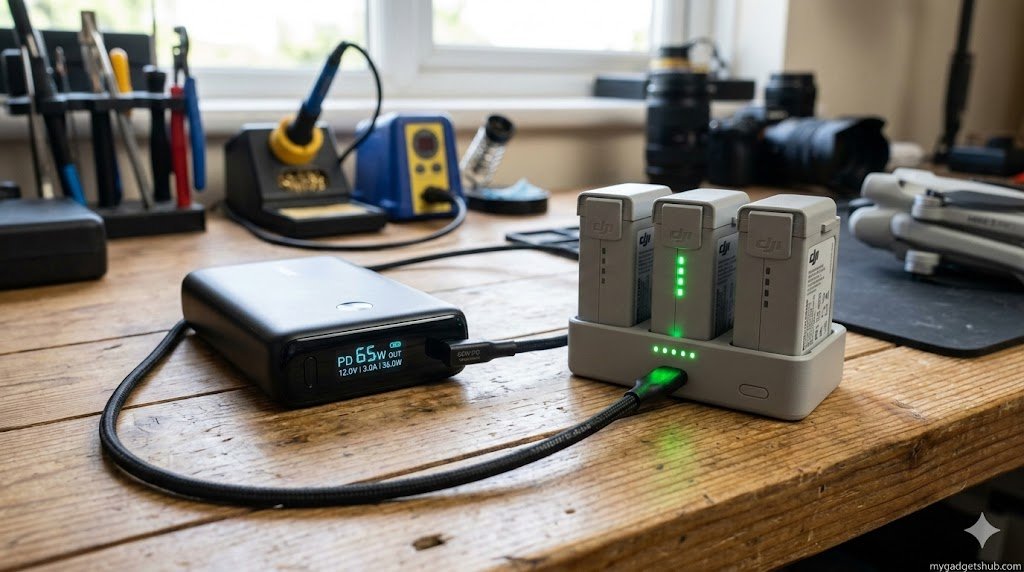
When you are miles away from a wall outlet, capturing raw photogrammetry data or shooting cinematic 4K landscapes in remote mountainous regions, waiting for drone batteries to trickle-charge is a workflow killer.
While DJI officially recommends their proprietary 30W wall charger, field creators rely on high-capacity PD (Power Delivery) power banks. But what actually happens when you plug a 65W or 100W power bank into the DJI Mini 3 Pro Two-Way Charging Hub?
Here is the real-world data on pushing the charging hub to its absolute limits.
The 30W Myth vs. The 36W Reality (Maximum Wattage)
If you read the official DJI manual, it states the hub supports a maximum of 30W. However, real-world hardware testing tells a slightly different story.
The Two-Way Charging Hub’s internal specifications list the following accepted inputs:
- 5V / 3A (15W)
- 9V / 3A (27W)
- 12V / 3A (36W)
When connected to a high-quality 65W PD power bank using the correct E-marked USB-C cable, the hub will negotiate the 12V/3A protocol, drawing up to 36 watts of peak power during the initial bulk-charging phase of a depleted battery.
Pros and Cons of Using a 65W Power Bank for Drones
Before you invest in a heavy laptop power bank for your drone bag, it is important to understand the trade-offs.
The Benefits:
- Faster Bulk Charging: Hitting that 36W peak shaves crucial minutes off your charging cycle compared to a standard 18W or 20W phone charger.
- The “One Brick” Workflow: A 65W PD power bank is versatile enough to fast-charge your drone, your laptop, the DJI RC controller, and your phone—eliminating the need to carry multiple proprietary chargers.
- Preserving Drone Batteries: Having a dedicated power bank means you don’t have to drain your expensive drone batteries to charge your remote controller via the hub’s reverse-charging feature.
The Disadvantages:
- Thermal Throttling: Pushing 36W of continuous power generates heat. If you try to charge a battery immediately after a long flight while it is still hot, the hub will throttle the wattage down to protect the lithium-ion cells, negating the speed benefits of the 65W brick.
- Weight and Portability: True 65W power banks with high capacities (20,000mAh+) are heavy, which can be an issue if you are hiking to a location.
- Efficiency Loss: You do not get a 1:1 power transfer. (See the math below).
While a 20,000mAh power bank is great for a day hike, if you are running a multi-day off-grid shoot and need to charge drone hubs alongside heavy-duty gear, you’ll need to step up to a high-capacity portable power station from brands like Anker or EcoFlow to keep your basecamp running.
Efficiency Loss: The 10,000mAh Math
A common misconception is looking at a 10,000mAh power bank and a 2453mAh DJI Mini 3 Pro battery and assuming you will get 4 full charges. You won’t.
Transferring power from a bank, through a cable, and into the charging hub results in about a 30% to 40% efficiency loss due to heat and voltage conversion. Furthermore, the Mini 3 Pro battery operates at 7.38V, while most power bank capacities are calculated at 3.7V.
- Real-World Expectation: A high-quality 10,000mAh power bank will effectively charge a standard Mini 3 Pro battery roughly 1.5 to 1.8 times. To charge a full Fly More combo (3 batteries) in the field, you need at least a 20,000mAh to 25,000mAh power bank.
Our Testing Methodology
To test the true charging logistics for mygadgetshub.com, we bypassed manufacturer claims and used an inline USB-C power meter.
- Power Source: 65W PD 3.0 Power Bank
- Cable: 100W E-marked USB-C to USB-C cable
- Batteries: 3x depleted DJI Mini 3 Pro Intelligent Flight Batteries (Standard 2453 mAh)
Real-World Charging Times (65W Power Bank @ 36W Peak Draw)
| Battery State | Time to Full Charge (Per Battery) | Total Time for 3 Batteries | Peak Wattage Observed |
| 0% to 100% | ~54 Minutes | ~162 Minutes | 35.7W |
| 20% to 100% | ~46 Minutes | ~138 Minutes | 35.2W |
| 50% to 100% | ~32 Minutes | ~96 Minutes | 28.5W (Tapered) |
The “Secret” to Fast Charging: Your Cable Matters
If you use a cheap, thin USB-C cable (or the standard one that came with an old smartphone), it lacks an E-marker chip. Without this chip, the power bank will refuse to output higher voltages for safety reasons, defaulting your drone hub to a sluggish 10W or 15W charge. You must pair your 65W power bank with a cable explicitly rated for 60W or 100W PD charging.
Reversing the Flow: Sequential Charging and Power Bank Mode
The hub does not just take power; it gives it.
- Sequential Charging: Providing 65W to the hub does not mean it will charge all three batteries at once. The hub uses sequential charging, prioritizing the battery with the highest remaining charge to get you back in the air fastest.
- Power Bank Mode: If your smartphone or DJI RC dies in the field, unplug the hub from your wall adapter, plug your device into the hub’s USB-A port, and the hub will discharge the drone battery with the lowest power level first to charge your gear. The beauty of the Two-Way Charging Hub is its emergency versatility. If you are miles away from the car and your smartphone, your smartwatch, or your budget TWS earbuds lose their charge, you can plug them directly into the hub’s USB-A port to siphon power from your lowest drone battery.
Frequently Asked Questions (People Also Ask)
Can I charge my DJI Mini 3 Pro with a 65W laptop charger?
Yes. As long as the laptop charger supports USB-C Power Delivery (PD), it is perfectly safe. The DJI Two-Way charging hub has a smart chip that will only negotiate and pull a maximum of 36W (12V/3A), regardless of whether you plug in a 65W, 100W, or 140W charger.
Does the DJI Mini 3 Pro charging hub charge all batteries simultaneously?
No. The hub uses sequential charging. It assesses the power levels of all inserted batteries and fully charges the one with the most power first, followed by the next highest, and so on.
Why is my DJI Mini 3 Pro battery charging so slowly?
If your battery is charging slowly, it is usually due to one of three reasons:
- You are using a cable without an E-marker chip, limiting power transfer.
- Your power adapter does not support PD protocols.
- The battery is too hot from a recent flight, causing the hub to thermally throttle the charge rate to protect the cells.
How many watts does the DJI Mini 3 Pro battery take?
Officially, DJI rates the maximum charging power for a single standard Intelligent Flight Battery inside the drone at 30W. However, when using the external Two-Way Charging Hub paired with a PD charger, it can draw peak bursts of up to 36W.
Can I leave drone batteries in the charging hub overnight?
While the hub features intelligent overcharge protection and will stop delivering power once the batteries are at 100%, it is not recommended for long-term storage. Storing lithium-ion batteries at 100% capacity for extended periods degrades their lifespan. If you aren’t flying for a few days, keep them around 60% capacity.